The homelab I run, the AI colleagues that help me run it, the websites I've built, and
the small tools that automate my day. Written for school, exams and job applications, in plain
language.
Each entry below follows the same shape: the problem I was solving, what I
actually built, the tools I used, evidence I can point to, and what I
took away from it. The goal is that anyone reading this, technical or not, understands what I did and why
it mattered, without needing me in the room to explain it.
What this covers
Homelab1 entry written
HQ1 entry written
Websites1 entry written
Automations1 entry written
How each entry is built
ProblemThe real need or gap, described concretely, not "I wanted to build something cool."
What I builtThe actual solution, in plain words a non-technical reader can follow.
TechThe tools and technologies used, named plainly.
ScreenshotReal evidence: a screenshot, or an honest diagram where a live screenshot isn't the right evidence.
What I learnedOne honest, specific takeaway, including things that didn't work first try.
HQ
HQ: a small company of AI colleagues that runs my homelab
Ongoing, 2026
problem
My homelab runs a dozen self-hosted services: files, media, network filtering, a ticketing site,
several websites. All of that needs constant, careful attention: monitoring, updates, backups,
incident response. I'm one person, with school and an apprenticeship on top, so I can't watch it
around the clock, and paying for managed IT support wasn't an option.
what I built
HQ: a small "company" of specialized AI colleagues (built on Claude), each responsible for one slice
of the infrastructure, network, storage, security, websites, automation, and so on, the same way a
real ops team would split the work. They coordinate through a shared ticket board, so problems get
picked up, worked and closed instead of getting lost in one long chat log.
The part I'm most proud of is the guardrails, not the AI itself: a gatekeeper program is the only
way any colleague can reach the actual servers, it checks who is allowed to do what, and it takes an
automatic backup before anything risky. Planned changes only happen in a quiet overnight window
unless something is actually broken, and anything big enough to matter needs my explicit yes or no
from my phone before it happens.
tech
Claude (Anthropic)PythonSSH command gatekeeperProxmox LXCTelegram botNode.js
screenshot
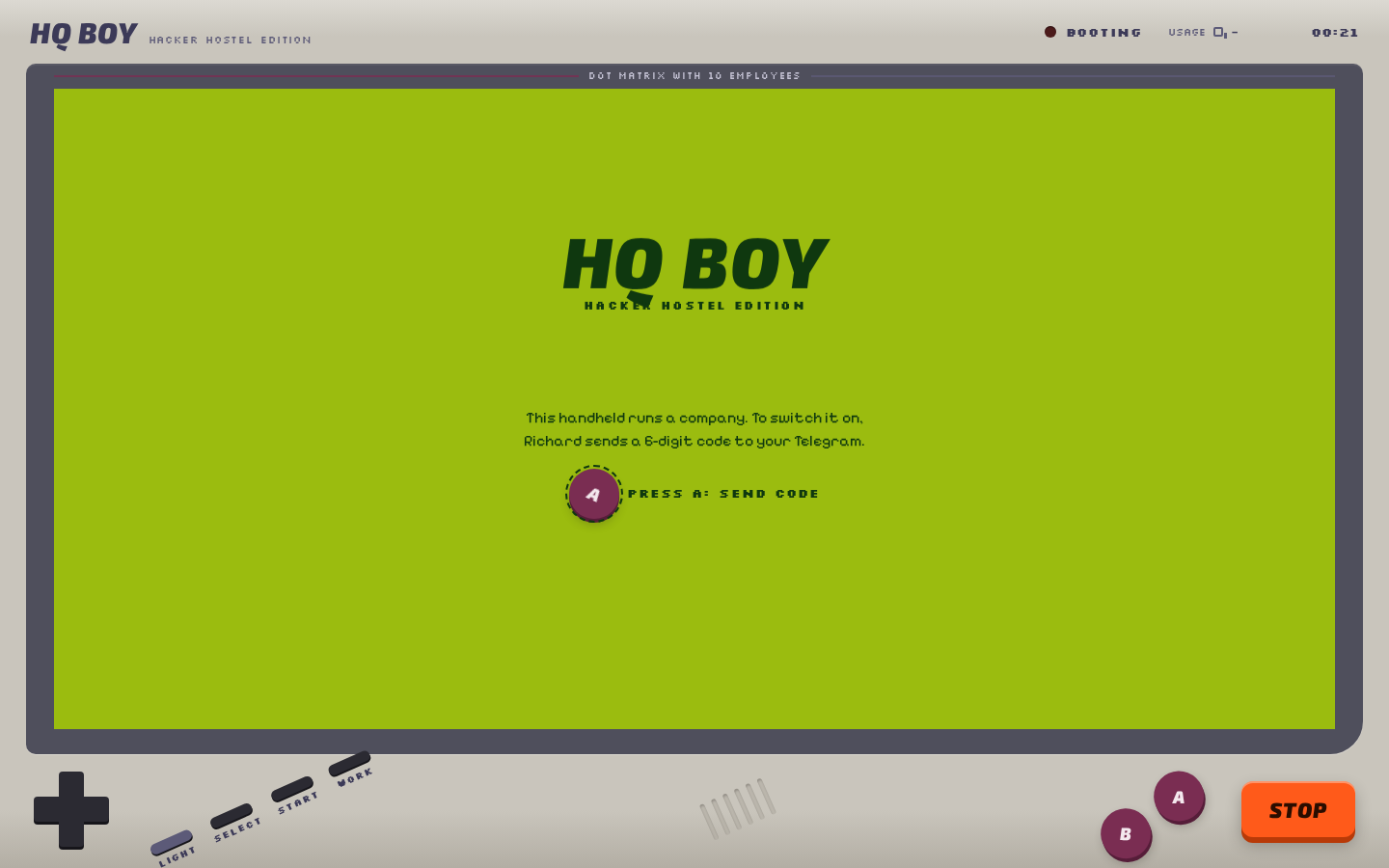
HQ Boy, the companion app I built so I can check on the company from my
phone. Login is a one-time code sent over Telegram, so this is genuinely the first thing you see.
"Getting an AI to do IT work was the easy part. The real design problem was deciding what it's never
allowed to do on its own, like touching backups or restarting something with people using it, and
what always needs my sign-off first. A system like this is only as trustworthy as its rules, not its
intelligence."
Homelab
A 3-node Proxmox cluster for self-hosting everything
Ongoing
problem
Cloud hosting for personal projects, files and media adds up in cost over time, and it means handing
my data to someone else's servers. I wanted one place to run everything I build and use, self-hosted,
properly backed up, and reachable from outside the house without opening ports on my home router (a
real security risk if done carelessly).
what I built
Three physical machines clustered together with Proxmox, each one hosting several virtual machines
and containers. Every guest gets a predictable IP address based on its own ID, so nothing needs a
lookup table to find. One machine is dedicated to backups: it takes a snapshot of every guest every
night and keeps a rolling history, so a broken update or a mistake is always recoverable.
Instead of opening ports on my router, every service that needs to be public goes out through its own
encrypted tunnel to Cloudflare, so nothing on my home network is directly reachable from the internet.
The HQ system described in the entry above runs on top of this and handles most of the day-to-day
upkeep.
tech
Proxmox VE 9LXC / KVMProxmox Backup ServerCloudflare Tunnel + DNSPi-holeWireGuardDocker
screenshot
Architecture diagram (not a product screenshot): three nodes, one of them
doubling as the backup target, public traffic arriving only through Cloudflare Tunnels.
"A backup job that runs quietly can also fail quietly. In September 2026 the backup drive's USB
connection dropped and nightly backups failed for a full week before anyone noticed, simply because
nothing was watching the backups themselves. I now treat a missing backup as an incident the same day
it happens, not something to discover a week later."
Websites
Real apps for real people, not just portfolio pieces
2025-2026
problem
Most student project briefs invent a fake client with fake requirements. I wanted practice building
for a real, specific need instead: a local business that actually needed working software, and a
personal idea I was curious to build end to end myself.
what I built
Warenerfassung ("goods capture") for an Asian grocery store in Schaffhausen: staff
scan a barcode and the app looks the product up, enriches it from Open Food Facts when the store
doesn't have the data yet, and tracks how complete each product's record is so gaps don't get lost.
It also ships as a desktop app (Electron), since a shop counter isn't always a great place for a
browser tab.
Connection Room is a smaller, personal project: a real-time room where everyone who
joins can see how they're connected to each other as a live graph, built to see how far I could push
WebSockets for something that has to feel instant, not just "eventually consistent."
Structure diagram (not a product screenshot): this runs on a shop's internal
network, not a public demo.
"Building for someone else's real workflow is a different discipline than building for myself. The
hard part of Warenerfassung wasn't the barcode scanning, it was designing the data-completeness
tracking so a busy shop worker could tell at a glance what still needed attention, without reading a
manual first."
Automations
Mail Agent: taking repetitive inbox work off my plate
2025-2026
problem
A lot of day-to-day admin, mine and small clients', is the same small set of actions repeated over
email: read something, decide what it means, do something about it. Doing that by hand doesn't scale
and is easy to let slip.
what I built
Mail Agent: a Python service that watches a mailbox and hands each message to a small set of
specialised agents, split cleanly into layers (core logic, integrations with outside services, and
the agents themselves), the same "split the work into specialists" idea behind HQ, just smaller and
for one job instead of a whole homelab. It runs containerised so it's easy to move between machines
without reinstalling anything by hand.
tech
PythonDockerAgent-based architecture
screenshot
Architecture diagram (not a product screenshot): this runs unattended in the
background, there's no UI to photograph.
"The first version tried to do everything in one script, and every new rule made the whole thing
harder to reason about. Splitting it into small agents behind one core, the same lesson HQ taught me
at a much bigger scale, made it possible to add a new capability without re-reading everything else
first."